olliePatent Pending

AAC on Apple devices

AAC App for iPad: Personalized Boards

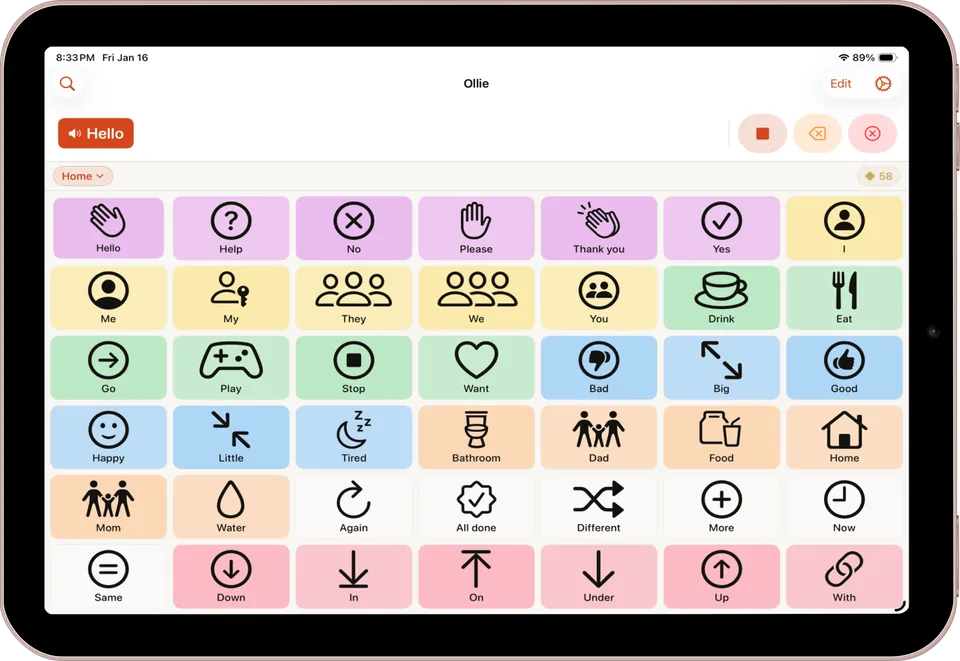
Turn a compatible iPad or iPhone into a communication tool built around your family member’s life. Ollie combines customizable boards, personal photos, speech output, and optional tools for generating vocabulary. Saved boards and standard device speech work offline, so everyday communication can continue without Wi-Fi.

Ollie AAC communication board on iPad

How Ollie may help

What a parent or caregiver can do on the device

Built-in eye-gaze access

Use Ollie with Apple’s built-in Eye Tracking on compatible iPad and iPhone models. Enable and calibrate Eye Tracking in the device’s Accessibility settings; no separate eye-tracking accessory is needed for Apple’s built-in feature. Evaluate positioning, selection accuracy, and comfort with the communicator.

Tap to speak

Build a message from symbols and words, then speak it aloud using voices available in Ollie.

Edit on the device

Create and reorganize boards, change button content, and use photos or built-in icons without a separate editor.

Core communication offline

Saved boards, vocabulary, and tap-to-speak communication work offline. AI-assisted generation requires a connection.

Use it thoughtfully

Questions to ask before choosing an iPad AAC app

  • Can the person reliably see and select the buttons?
  • Will the device be available whenever communication is needed?
  • Does the vocabulary organization make sense to the person using it?
  • Does the app support the person’s required language and access method?

Before choosing

Where fit matters

  • Ollie requires iOS or iPadOS 18.6 or later.
  • An everyday iPad may need a durable case, appropriate device settings, and a plan for charging and availability.
  • Ollie works with Apple’s built-in Eye Tracking on compatible iPads and iPhones. Check device compatibility and test the intended access method and positioning.

Important: An iPad and an AAC app are only parts of a communication system. Individual access, vocabulary, positioning, and support needs should guide the choice.

Common questions

What to know

Does Ollie work on both iPad and iPhone?

Yes. Ollie is available for compatible iPads and iPhones through the Apple App Store.

Does Ollie need Wi-Fi to speak?

No. Saved boards, sentence building, and core speech work offline. AI-generated boards, suggestions, and icons need an internet connection.

How can I check Ollie before using it without Wi-Fi?

Prepare and save the boards you need while connected. Then turn off Wi-Fi and mobile data and try those boards, sentence building, and standard device speech on the intended device. AI generation needs a connection; do not rely on it to create missing vocabulary while offline.

Can I use my own photos on a communication board?

Yes. Ollie supports custom button images using photos or built-in icons, and boards can be edited on the device. AI-generated icons are optional.

Is an iPad AAC app right for everyone?

No single device or app fits everyone. Consider vision, hearing, motor access, language, vocabulary, environment, and the user’s preferences.

Try Ollie on the Apple device you already use

Explore the touch interface, build a small board, and evaluate it with the person who will communicate with it.