olliePatent Pending

AAC app comparison

Proloquo2Go Alternative: $9.99 Ollie Core

Looking for a Proloquo2Go alternative? Try the full Ollie app free for 7 days, then pay $9.99 once for offline Core for life. After the trial, smart feature usage costs extra through in-app purchases. Compare vocabulary, editing, access, and everyday workflows below before choosing the app that fits.

7-day full free trial

Then $9.99 once

Offline core communication. Yours for life.

Use saved boards, build messages, and tap to speak offline. No ongoing subscription is needed for Core after the one-time unlock.

After the trial, smart feature usage requires additional in-app purchases and is not included in the $9.99 Core price.

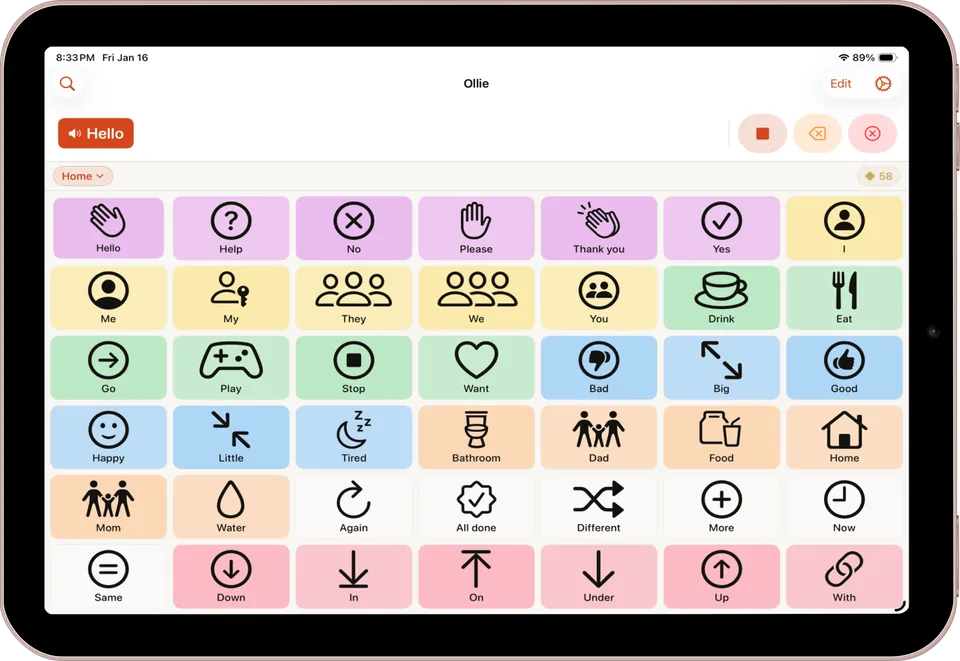
Ollie AAC communication board on iPad

Side-by-side

Ollie and Proloquo2Go

Facts checked November 17, 2026. Prices and features can change.

Swipe the table to compare both apps →

CompareOllieProloquo2Go
Pricing7-day full free trial, then $9.99 once for offline Core for life; smart features cost extra after the trialSeparate App Store purchase with an optional vocabulary purchase; see current listing
Apple platformsiPhone and iPadiPhone, iPad, and paired Apple Watch
Vocabulary approachCustom boards with optional AI-assisted generationCrescendo core-word vocabulary with 10,000+ fringe words
Listed languagesEnglish, French, German, SpanishEnglish, Dutch, French, Spanish
Access and displayTouch and Apple’s built-in Eye Tracking on compatible devices; adjustable press duration, scalable text and images, accessibility labelsIncludes switch scanning, VoiceOver, and other accessibility settings
Custom visualsBuilt-in icons, photos, optional generated iconsSymbol library and personal photos
Team reviewTalk Trail activity; Pro goals, observations, and reportsCompare with your team’s existing documentation workflow

Compare the everyday workflow

From preparing a board to reviewing what happened

Prepare vocabulary for a real activity

With Ollie

Describe a trip, meal, or interest—or use a photo—to draft an editable communication page. Choose the page language and grid size, review the words, and personalize the buttons. Combine generated pages with your own board editing to prepare vocabulary for daily life.

With Proloquo2Go

Start from Crescendo’s organized vocabulary, grammar support, and keyboard access. Customize words, visuals, and folders for the communicator’s activities and preferences. Try the preparation workflow in each app with a real upcoming conversation.

Support the message as it develops

With Ollie

Request word suggestions informed by the current sentence, page, and existing vocabulary. Learned personalization is available with eligible plans. The communicator chooses what to use; suggestions do not decide their intent or speak on their behalf.

With Proloquo2Go

Crescendo supplies a structured route through vocabulary and grammar. Evaluate whether the communicator benefits more from that familiar organization or from optional contextual suggestions alongside their Ollie boards.

Make the visuals personal

With Ollie

Use built-in icons and personal photos, or generate an icon for a word that needs a different visual. Edit labels and content on the device. AI imagery is optional: recognizable, consistent visuals matter more than generating something new.

With Proloquo2Go

Choose from a large symbol library and add personal photos. Both apps support personalizing the visual vocabulary; Ollie also offers credit-funded icon generation.

Bring evidence to the next team conversation

With Ollie

Talk Trail shows app activity and vocabulary use. Pro adds goals, caregiver observations, PDF reports, CSV exports, and reviewable AI planning drafts. A family can add context to the record, and an SLP can review it alongside their own assessment—not treat tap counts as proof of independent communication.

With Proloquo2Go

The Proloquo2Go sources linked below focus on communication, vocabulary customization, access, and backup workflows. If integrated goals, observations, and planning reports are a priority, compare Talk Trail directly with your team’s existing documentation process; we do not assume undocumented features are absent.

Keep a usable copy of the vocabulary

With Ollie

Export and import .ollieboard files containing pages, images, recorded audio, and board settings. Saved page revisions help recover earlier edits. Sharing a board file is not automatic cloud synchronization, and Ollie does not directly import Proloquo2Go vocabulary files.

With Proloquo2Go

Proloquo2Go documents backup sharing through AirDrop, backup restoration, and sharing buttons or folders. This is a concrete workflow to test when multiple supporters maintain the vocabulary—not a promise of automatic live collaboration.

Choose what you pay for

With Ollie

Core communication is separate from optional smart and professional tools. AI actions use credits; Basic and Pro add different entitlements. Compare the ongoing tools you need as well as the Core purchase, and check current App Store terms.

With Proloquo2Go

Proloquo2Go has its own App Store purchase and optional purchases. Compare the full configuration you need, including language and vocabulary requirements; a headline price alone does not tell you whether either system fits.

Use it thoughtfully

What to try in each app

  • Build a message using words the communicator wants in daily conversation.
  • Prepare vocabulary for the same activity and compare editing, organization, and navigation.
  • Test the required language, voice, display, and access settings on the intended device.
  • Walk through sharing, backup, and team review with the people who will support the system.

Before choosing

Where fit matters

  • Keep familiar vocabulary available while exploring a new app.
  • Compare vocabulary organization, access, languages, backup, support, and ongoing costs using the same requirements.
  • Include the communicator and their support team in the trial and decision.

Important: Each app has its own vocabulary organization and file formats. Plan any transition around the communicator’s preferences and familiar ways of finding words.

Common questions

What to know

How do Ollie and Proloquo2Go pricing compare?

Ollie includes a 7-day full free trial, then a one-time $9.99 purchase for offline core functionality for life. After the trial, smart feature usage requires additional in-app purchases. Proloquo2Go has a separate purchase model; check its linked App Store listing and optional purchases when comparing total cost.

Does Ollie include the Crescendo vocabulary?

Crescendo belongs to Proloquo2Go. Ollie offers customizable boards, manual and AI-assisted page creation, and contextual suggestions with its own vocabulary organization.

How can an existing Proloquo2Go user try Ollie?

Keep the current communication system available while trying Ollie for a familiar activity. Explore its board editing, suggestions, and Talk Trail together, then decide whether its workflow fits the communicator’s preferences and needs.

Try the full Ollie app free for 7 days

Build a board for an everyday conversation. After your trial, keep offline Core for life for $9.99 once. Smart features are available through additional in-app purchases.

Proloquo2Go is a trademark of AssistiveWare B.V. TouchChat and WordPower are associated with their respective owners. Ollie is not affiliated with or endorsed by those companies.