olliePatent Pending

AAC app comparison

TouchChat Alternative: $9.99 Ollie Core

Looking for a TouchChat alternative? Try the full Ollie app free for 7 days, then pay $9.99 once for offline Core for life. After the trial, smart feature usage costs extra through in-app purchases. Compare vocabulary, editing, access, and everyday workflows below before choosing the app that fits.

7-day full free trial

Then $9.99 once

Offline core communication. Yours for life.

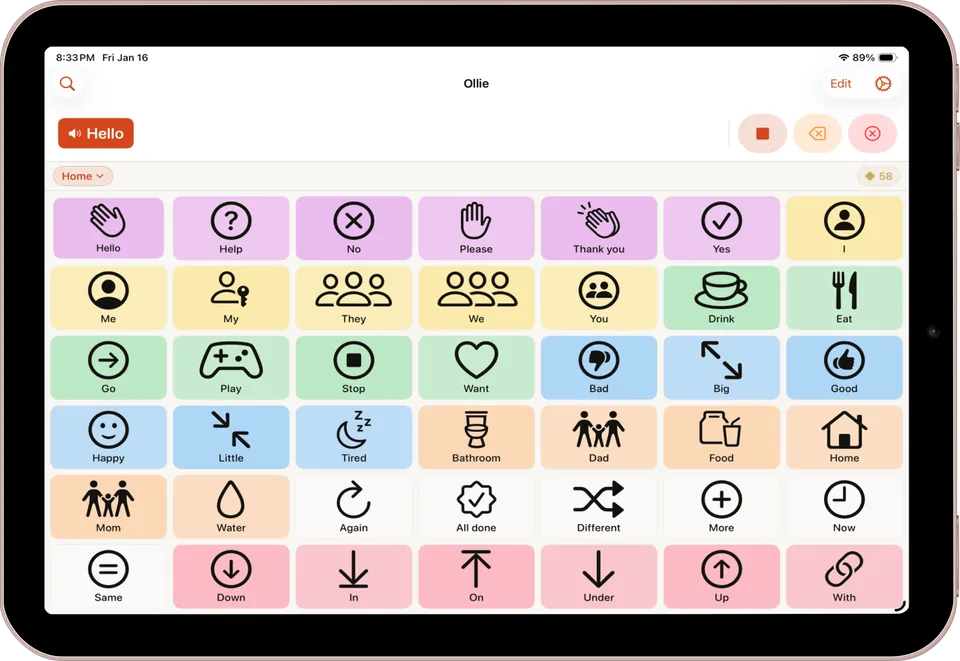
Use saved boards, build messages, and tap to speak offline. No ongoing subscription is needed for Core after the one-time unlock.

After the trial, smart feature usage requires additional in-app purchases and is not included in the $9.99 Core price.

Ollie AAC communication board on iPad

Side-by-side

Ollie and TouchChat with WordPower

Facts checked November 17, 2026. Prices and features can change.

Swipe the table to compare both apps →

CompareOllieTouchChat with WordPower
Pricing7-day full free trial, then $9.99 once for offline Core for life; smart features cost extra after the trialSeparate App Store purchase with optional in-app purchases; see current listing
Apple platformsiPhone and iPadiPhone and iPad
Vocabulary approachCustom boards with optional AI-assisted generationWordPower and other included vocabulary files
Listed languagesEnglish, French, German, SpanishEnglish, Arabic, French, Hebrew, Simplified Chinese, Spanish
Access and displayTouch and Apple’s built-in Eye Tracking on compatible devices; adjustable press duration, scalable text and images, accessibility labelsScanning, head tracking, and compatible eye-tracking options
Page creationDescription- or photo-guided editable pagesManual editing and AI-assisted topic pages
Message assistanceContextual word suggestions; plan-dependent personalizationAI editing, translation, and personalization
Activity reviewTalk Trail activity; Pro goals, observations, and reportsData logging, file export, and Realize Language analysis

Compare the everyday workflow

What each app helps you do day to day

Turn an activity into a communication page

With Ollie

Start with a description or a photo, choose a grid size and page language, and generate an editable set of buttons. A parent can prepare words for a weekend outing; an SLP can draft a page for a session. Review and personalize the result with the communicator.

With TouchChat with WordPower

TouchChat offers AI-assisted topic-to-page creation, editable word lists, and page templates. Both apps support generated pages; try the same topic in each and compare the preparation and editing workflow.

Get support while building a message

With Ollie

Request suggestions informed by the developing sentence, current page, and existing vocabulary. Basic and Pro add learned personalization from selections and preferences. Choose suggestions as you build the message, keeping the communicator in control of what is spoken.

With TouchChat with WordPower

TouchChat documents AI message editing, translation, and personalization through Learning Mode and personas. Compare those message-editing tools with Ollie’s contextual word suggestions using the communication tasks you want to support.

Personalize the board without starting from scratch

With Ollie

Edit labels and spoken text, choose photos or built-in icons, record audio, and adjust grids and colors. Optional generation helps create pages and visuals; undo, redo, and saved page revisions support your editing workflow.

With TouchChat with WordPower

TouchChat combines WordPower vocabulary with configurable button actions, grids, pages, symbol libraries, and personal images. Try the changes you make most often in each app, from adding a photo to organizing a page.

Connect communication activity to team review

With Ollie

Talk Trail shows activity and vocabulary use. Pro adds caregiver observations, goals, PDF reports, CSV exports, and AI planning drafts for a supporter to review and edit. This gives a family and SLP a shared starting point for discussion, not an automated clinical assessment.

With TouchChat with WordPower

TouchChat can log language usage, export the data for manual analysis, or upload it to Realize Language for web-based analysis. Both offer ways to review activity; compare Ollie’s integrated goals-and-observations workflow with TouchChat’s logging and analysis workflow.

Know what needs a connection

With Ollie

Saved boards, sentence building, and standard device speech work offline. Optional board generation, contextual suggestions, and generated icons require internet and credits. Plan for connectivity when preparing materials, without making everyday core speech depend on it.

With TouchChat with WordPower

TouchChat’s 2026.1 notes describe on-device AI editing, translation, and image generation on Apple Intelligence-compatible hardware with iOS 26. Check the requirements for each feature on your device; the apps do not have identical AI hardware or connectivity requirements.

Separate everyday communication from optional extras

With Ollie

Ollie separates Core access from credit-funded AI and Basic or Pro entitlements. You can evaluate core communication separately from the smart tools and professional reporting you want to add. Review current terms and the actual plan limits before purchasing.

With TouchChat with WordPower

TouchChat with WordPower is a separately purchased edition with optional in-app purchases. Compare that edition—not TouchChat Lite or another package—and include any vocabulary, symbol, or analysis extras your team needs.

Use it thoughtfully

What to try in each app

  • Create a page for the same activity and personalize its words and visuals.
  • Build a message and try the available suggestions or editing tools.
  • Check touch settings and any required alternative access on the intended hardware.
  • Review how each app fits your team’s vocabulary sharing, documentation, and support needs.

Before choosing

Where fit matters

  • Both apps offer AI-assisted creation. Compare the workflow, connection requirements, hardware, and review controls rather than treating AI as an exclusive feature.
  • Some TouchChat access features depend on device model or additional hardware.
  • Preserve an AAC user’s learned vocabulary and motor patterns unless a carefully evaluated change has a clear benefit.

Important: Ollie and TouchChat use different vocabulary organization and file formats. Keep familiar communication available while exploring either app and planning any transition.

Common questions

What to know

How do Ollie and TouchChat pricing compare?

Ollie includes a 7-day full free trial, then a one-time $9.99 purchase for offline core functionality for life. After the trial, smart feature usage requires additional in-app purchases. TouchChat has a separate purchase model; check its linked App Store listing and optional purchases when comparing total cost.

Does Ollie include WordPower?

No. WordPower is a separate vocabulary system bundled with this edition of TouchChat. Ollie uses its own customizable board approach.

Does Ollie offer the same access methods as TouchChat?

Ollie supports direct touch and Apple’s built-in Eye Tracking on compatible iPads and iPhones, plus adjustable press duration, scalable text and images, and accessibility labels and actions. TouchChat also documents scanning and compatible tracking hardware. Built-in Apple Eye Tracking and third-party tracking systems are distinct options; compare the exact device and setup with the communicator.

Try the full Ollie app free for 7 days

Build a board for an everyday conversation. After your trial, keep offline Core for life for $9.99 once. Smart features are available through additional in-app purchases.

Proloquo2Go is a trademark of AssistiveWare B.V. TouchChat and WordPower are associated with their respective owners. Ollie is not affiliated with or endorsed by those companies.