Customizable touch boards
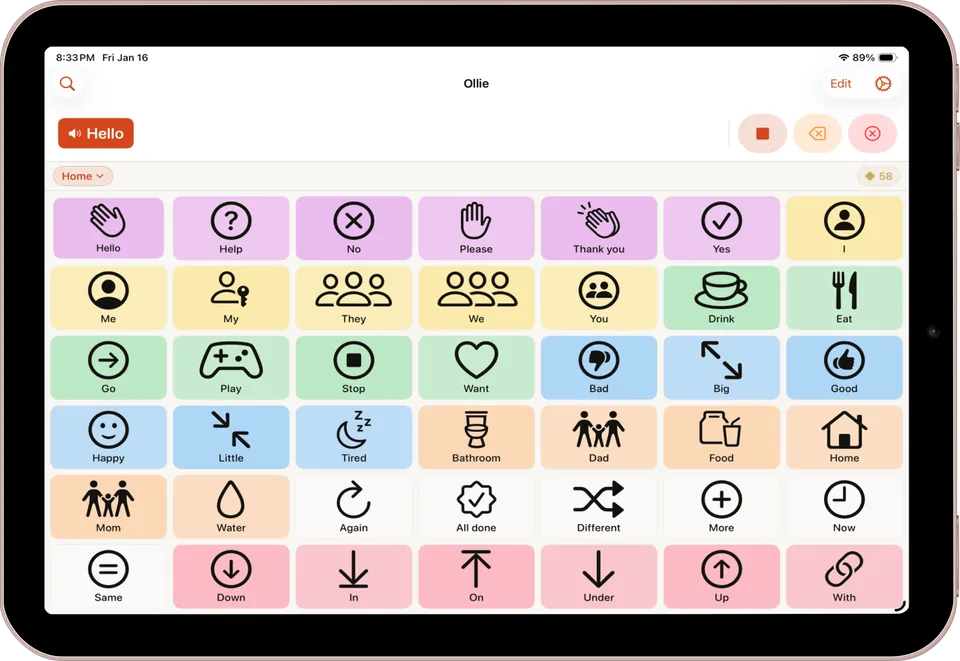
Organize words and symbols into visual grids and adjust the board content around daily communication.
AAC and cerebral palsy
Ollie brings customizable communication boards and speech output to iPhone and iPad, with adjustable press duration and scalable text and images. Ollie also works with Apple’s built-in Eye Tracking on compatible devices. Explore touch or eye-gaze access with the communicator and their AAC team, checking positioning, accuracy, and comfort.
How Ollie may help
Organize words and symbols into visual grids and adjust the board content around daily communication.
Tap a button to speak immediately or build a sentence before playing it aloud.
Use Ollie on a compatible iPad or iPhone with the case, position, and mounting approach chosen by the user’s team.
Use it thoughtfully
Before choosing
Important: Ollie does not treat cerebral palsy. A qualified AAC team can help assess access methods, positioning, vocabulary, and devices before a long-term choice is made.
Common questions
Use Ollie with Apple’s built-in Eye Tracking on compatible iPad and iPhone models. Enable and calibrate Eye Tracking in the device’s Accessibility settings; no separate eye-tracking accessory is needed for Apple’s built-in feature. Evaluate positioning, selection accuracy, and comfort with the communicator.
Yes. Boards, words, images, and organization can be edited, but the app’s access method should be evaluated separately.
No. Device size, mounting, touch accuracy, fatigue, and alternative access needs differ by person.
Keep exploring
Try touch or Apple’s built-in Eye Tracking in the positions and settings that matter, and let comfort, accuracy, and fatigue guide the next step.